This product must be used in a global network environment
APIs & Integrations
API Example
How to use
Quick Start
Make a request
Test Example 
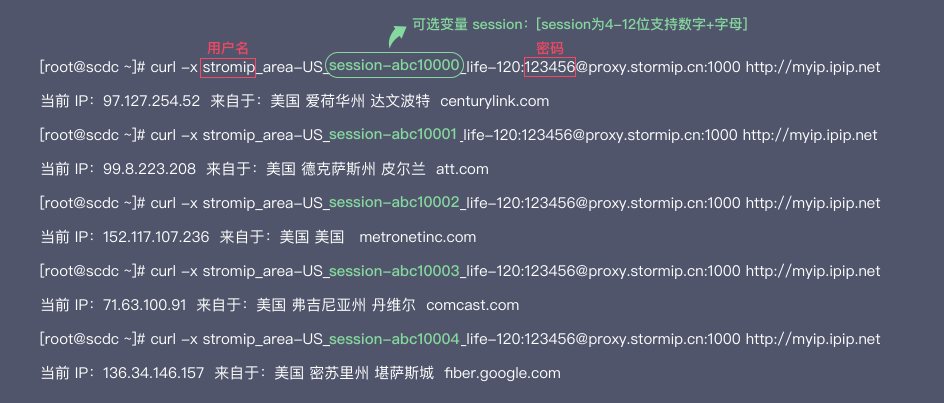
Control session
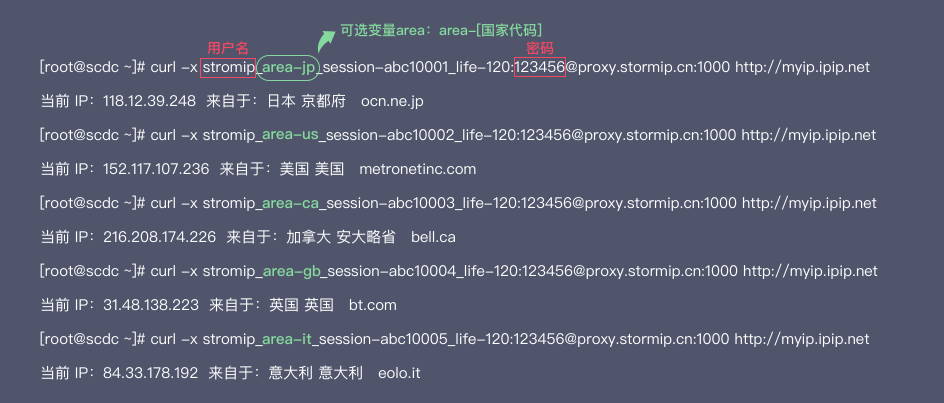
Control multiple regions
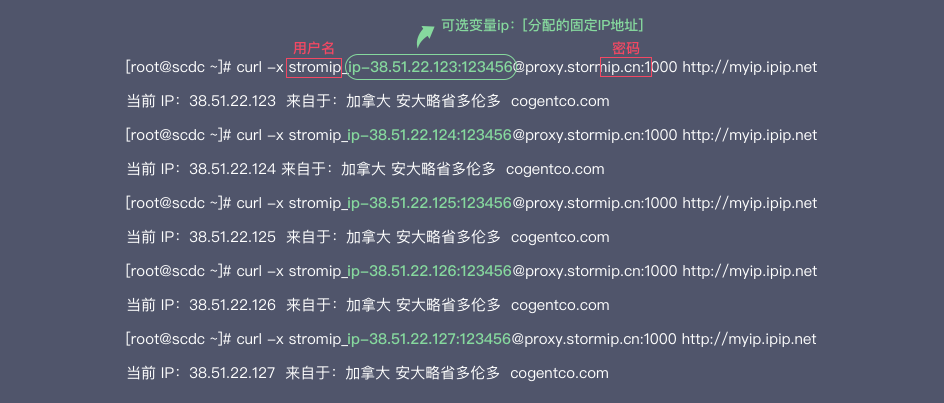
Control the specified export IP
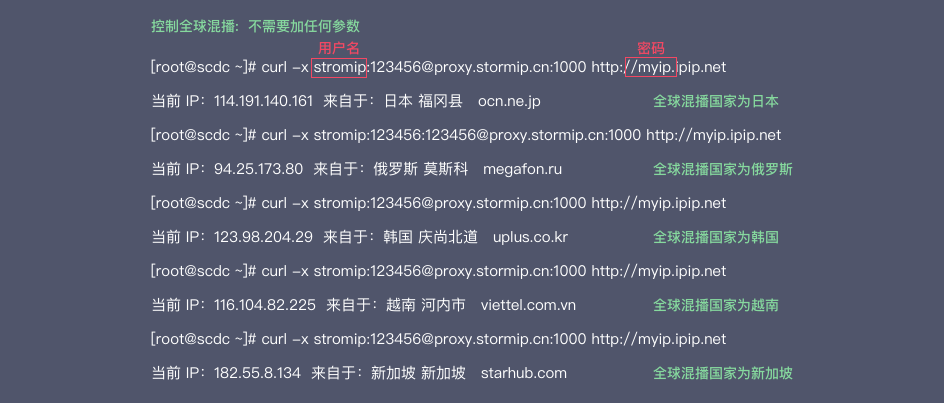
Control global mixing
Sticky proxy switching
Package Type
Dynamic Residential Traffic
Long Acting Residential IP
Code Language:
General mode
Generate all
Shell
Node.js
Java
C#
Go
PHP
Python
Ruby
Rust
How to use
Param Desc
username: username
password: password
session: Don't fill in: Each request provides a different IP; fill in: Make sure to supply the same IP as much as possible; maximum 12 digits
life: Keep IP usage time, unit minutes, minimum 1, maximum 24*60
area: Global Region Code For example: United States area-US View
city: City of origin: New York city-newyork View
state: State code View
ip: Specify the data center address
Response code
If the request does not contain the host to be connected, or if a general error occurs when parsing the HTTP request, the proxy server returns this error code.
Please make sure your request is formatted correctly and make sure you include the URL in the request and try again;
407
Requires proxy verification
The request is missing proxy authentication information, or the username or password is invalid.
Please include the proxy authorization header in your request and make sure your username and password are formatted correctly, and try again.
500
Internal Server Error
The proxy server encountered an internal error and tried the request later.
The proxy server receives an invalid response from the upstream server.
Retry the request.
Response code 502 indicates that the IP assigned to your session ID is no longer available.
If you encounter this error, there are two ways to fix it.
The first method is to wait for a minute, and the system will automatically assign a new IP address to your session ID.
Another way is to simply switch to a new session ID (i.e., change the sessid parameter), so you will receive a new IP address.
The proxy server did not receive a response from the upstream server in time.
Retry the request.
Custom HTTP status code - This means that the proxy cannot find the exit node that satisfies the request.
Please change the request filter parameters or try again later.
Quick Startapi.sec1
StormProxies uses Basic Access Authentication, requiring you to provide a username and password when connecting to a proxy server.
You can manage your user list through your Personal Center Agent Account after logging in.
Or contact the exclusive account manager and technical support team to obtain your credentials.
Replace USERNAME and PASSWORD in the code with your credential content.
curl -x proxy.stormip.cn:1000 -U "customer-USERNAME:PASSWORD" https://api.ip.cc
parameter describe
username
Use the session ID to keep the upcoming queries the same IP address.
The session has no expiration time and will run indefinitely.
Random string; supports 0-9, A-z characters.
password
In this example, the query proxy.stormip.cn is executed from a random IP:
  var request = require('request');

  request({
    'url':'https://api.ip.cc',
    'method': "GET",
    'proxy':'http://USERNAME:PASSWORD@proxy.stormip.cn:1000'
  },function (error, response, body) {
    if (!error && response.statusCode == 200) {
      console.log(body);
    }
  })
Make a request
No session control requests, will be randomly sent using one IP each time:
curl -x USERNAME:PASSWORD@proxy.stormip.cn:1000 https://api.ip.cc
Designated region, use the IP of the specified region:
curl -x USERNAME_area-US:PASSWORD@proxy.stormip.cn:1000 https://api.ip.cc
Keep the session unchanged during IP availability:
curl -x USERNAME_session-testsession:PASSWORD@proxy.stormip.cn:1000 https://api.ip.cc
Keep the session and automatically change the new IP every 1 minute:
curl -x USERNAME_life-1:PASSWORD@proxy.stormip.cn:1000 https://api.ip.cc
Sticky proxy switching
By accessing the sticky proxy switch link, the current IP can be replaced without modifying the proxy configuration. The IP switch link can be replaced.:
http://6.6.6.6/ 
Welcome StormProxies
Register now and get 1G traffic
Working hours:9:00-23:00